Why AI-Built Apps Break · For business owners
Is it safe to open a .zip project in Claude Code or Cursor?
Short answer If you use an AI coding tool on your computer, don't point it at a project someone sent you as a .zip, shared folder or USB stick. Hidden settings inside can make some tools run a program as you. Ask for a GitHub link instead, and keep your tools updated.
A freelancer sends your app back as a .zip. You open the folder in Claude Code. Until version 2.1.196, that was enough: before you typed a word, before you could answer whether you trust the folder, a program hidden in the project could run on your computerSource 1. On 1 September 2026 the security firm Manifold published this trick, which it calls GitSpawn: eight flaws in seven AI coding tools, Cursor and Codex among themSource 1, and more it doesn't nameSource 1.
Manifold tested tools that run on your own computer, not browser builders such as Lovable or Bolt. If you or your developer use Claude Code, Cursor, Codex or a similar tool on a laptop, read on.
The risk is in how the project arrives
Most software projects use Git, a tool that records every change to the files. Git keeps its settings in a hidden folder inside the project, and some of those settings can name a program to run. When the project travels as a copied folder, such as a .zip file, a shared drive, a synced folder or a USB stick, that hidden folder travels with itSource 1. Downloading a project with Git itself, called a clone, never brings those settingsSource 1.
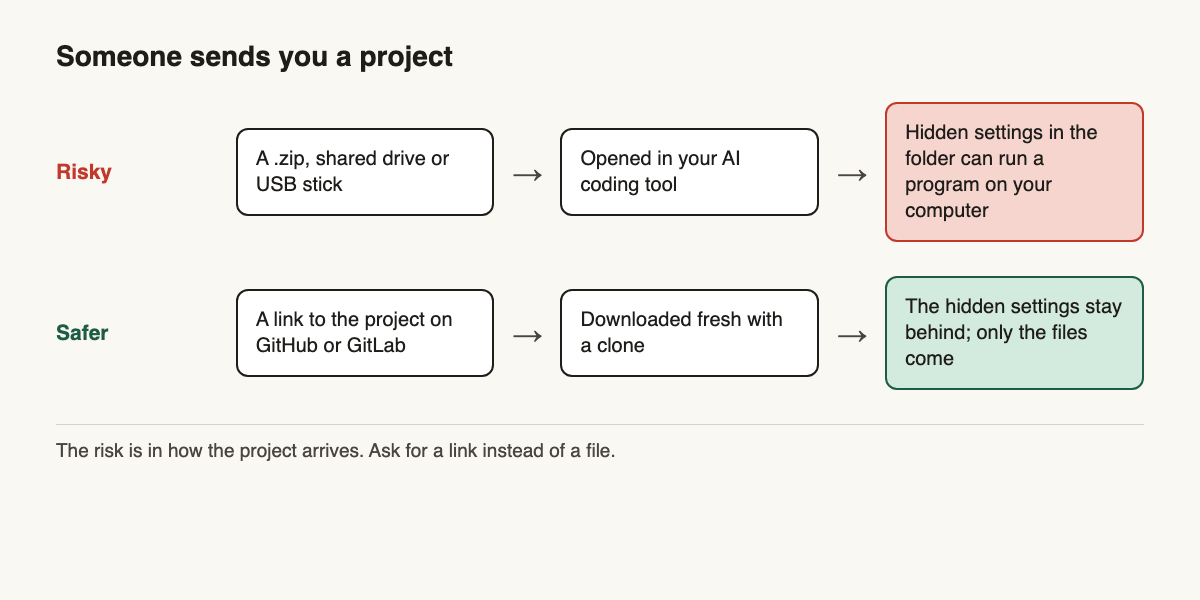
This isn't a new idea. Back in 2024, the Git project advised against using Git in projects received as archives from untrusted sourcesSource 2. What changed is that AI coding tools now run Git by themselves: some as soon as they open the folder, others as soon as you start typing or ask for a reviewSource 1. Nothing asks you first.
What a planted program can reach
A program that runs this way runs as you, outside the tool's safety sandbox, with no approval prompt and nothing on screenSource 1. Manifold lists what that hands over: SSH keys (the keys your computer uses to log in to GitHub and servers), the cloud passwords and tokens stored on the machine, every project on the disk, and a foothold on the computerSource 1. When we planted a harmless command in a test project for the engineer version, Git's status check still printed "nothing to commit, working tree clean" while it ran. You would not notice.
Projects arrive as files more often than you think
A freelancer hands back your app as a .zip. A contractor shares a folder on Google Drive. A "client" asks for a quote and attaches their code. A job applicant returns a take-home coding test, or a recruiter sends one to your developer.
That last route is already being used. Check Point's threat report of 7 September described a campaign by an Iran-linked group, Mirage Kitten, sending malware through fake LinkedIn coding testsSource 3. We know of no case of GitSpawn itself being used against a business yet, but the delivery route is in use.
Ask for a link first, then four more safeguards
- Ask for a link, not a file. If someone sends you a project, ask them to put it on GitHub or GitLab and send you the link. A fresh clone leaves the hidden settings behind.
- If all you have is a file, don't point your AI tool at it. Ask the sender to put it on GitHub, or ask a developer for a clean copy.
- Update your AI coding tools. By 1 September, four of the eight were fixed, Claude Code's start-up, Cursor and Codex among them. Four were not, including one in Claude Code's
ultrareviewreview commandSource 1. Turn on automatic updates if your tool offers them. - Keep these tools off the computer you bank on. A separate computer, or at least a separate user account, keeps a planted program away from the logins and files that matter most.
- Tell your freelancers and staff. One sentence in your next message: "Please send projects as a GitHub link, not a zip."
Keep your code in your own GitHub account
The simplest way to make "send me a link" normal is to own the place the code lives. Create a free GitHub account for your business, create the project there, and invite your freelancer to it. Their work then lands in your account, and when you want to open it with your AI tool, you ask it to start from the link: "Clone https://github.com/your-business/your-app into a new folder." No zip ever touches your laptop.
Your developer will want the details: the engineer version of this post has the test results, which tools were affected, and the settings that block it.
- Projects come to you as links, not files
- Your code lives in your own GitHub account
- AI coding tools are on their latest version Automatic updates on.
- They don't run on the computer you bank on
- Freelancers and staff know the rule
Next step
Get new posts as they come out
Every new post, in plain English and in depth. Follow the RSS feed.
Sources
- GitSpawn: A Single Flaw Lets Untrusted Repos Run Code in Claude Code, Codex, Cursor, and Grok (Manifold Security, Sep 1, 2026). Retrieved . ↩ ↩ ↩ ↩ ↩ ↩ ↩ ↩ ↩
- Protections for cloning untrusted repositories can be bypassed (Git security advisory, CVE-2024-32465). Retrieved . ↩
- 7th September Threat Intelligence Report (Check Point Research). Retrieved . ↩