Why AI-Built Apps Break · For business owners
Is your AI-built app leaking data? A 10-minute check
Short answer It might be. Many AI-built apps let the browser read the database directly, so one unlocked table can expose every customer record. Without code, you can check the three places leaks start in ten minutes: the database's rules, who can open the app and who can read the project.
On 31 January, researchers at Wiz opened Moltbook, a new social network built with AI, the way any visitor would. Within minutes they could read its whole database, including 35,000 email addressesSource 1. In May, the security firm RedAccess told Axios it had found 380,000 apps and sites built with AI tools open to anyone, about 5,000 of them holding sensitive company dataSource 2.
None of it needed a stolen password, only something left open that should have been locked. If you built an app with an AI tool and it keeps anything about your customers, here are the three places to look.
Why AI-built apps leak
Many apps built with Lovable or a similar tool have no back office of their own. The page in your customer's browser talks straight to the database, often one hosted by SupabaseSource 3. To do that, the page carries a key, and that key is meant to be publicSource 4. Think of it as your database's street address, not the key to its front door.
What decides who sees what is a set of rules inside the database, which Supabase and Lovable call policies. The switch that makes the database enforce them is called Row Level Security, or RLS. A row is one record: one customer, one order, one message. With RLS on and a policy that says "each customer reads their own rows", Ann sees her orders and nobody else's. With RLS off, anyone who has the public address can read every row.
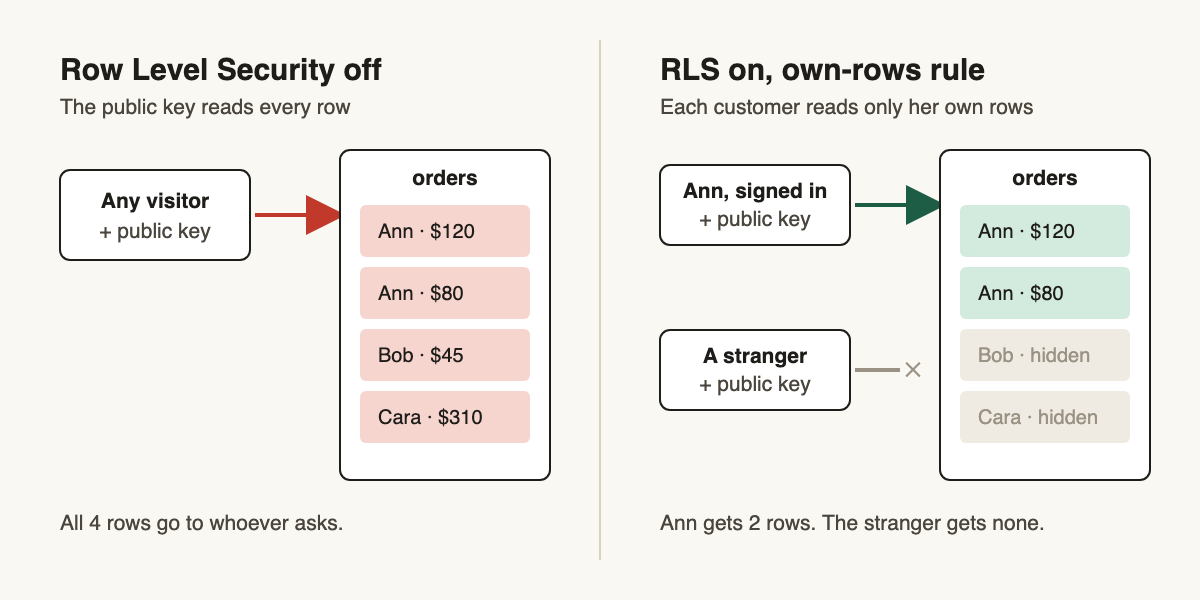
We tested four ways this lock stays open in the engineer version of this post. Here is the owner's version: three places, ten minutes, no code.
Three places to check, in ten minutes
1. The database: turn on Row Level Security for every customer table
If your app uses Supabase directly, open your project in Supabase and go to the Table Editor. Supabase puts a warning label on any table that has RLS switched offSource 5. A table holding names, emails, orders or messages should never carry that label. Then open Security Advisor in the same dashboard. It checks for tables without RLS and for policies that let more through than they shouldSource 5.
If you built on Lovable Cloud, there is no Supabase dashboard. Open your project's Security view and run the deep scan. Its checks include tables without per-record access control and rules that let everyone throughSource 6. Your policies are under More → Cloud → Database → RLS policiesSource 6.
When you switch RLS on, your app may suddenly show empty lists. That is the lock working: until a policy says who may read what, nobody can. Don't switch it back off. Ask your AI tool for a policy instead.
A table can also have RLS on and still be wide open, if its policy says "everyone may read". It is the quickest way to make an empty page show data again, and in our test for the engineer version it gave a stranger every row, exactly as if RLS were off. The Table Editor's warning label won't catch it, because RLS is on. You don't have to read the policies yourself. Paste this into your AI tool and it will list them in plain English:
Review this project's database security and report only. Do not change anything.

1. List every table and say whether Row Level Security is on.
2. For each table, explain in plain English who can read it and who can change it, including visitors who are not logged in.
3. Flag any policy that lets anyone read or change a table with personal data: names, emails, phone numbers, addresses, orders, payments or messages.
4. Flag any secret key (a Supabase secret or service_role key, or a Stripe or OpenAI key) that appears in code that runs in the browser.
5. List every view and say whether a logged-out visitor can read personal data through it.

Answer as a short table: table or view, who can read, who can change, problem, suggested fix.
A prompt is not an audit: AI review can miss problems, flag ones that aren't there, and answer differently each run. Don't point agents at code you don't trust; text hidden in it can steer them.
2. The app: put a login on anything internal
In May, researchers told Axios that some of these tools made new apps public unless you switched them to privateSource 2. That is fine for a landing page and wrong for an internal tool full of customer records. Open your app's publish or sharing settings and check who can visit the live link. An app only your staff use should ask them to log in.
The tool makers push back. Replit's chief executive said public apps being reachable on the internet is expected behaviorSource 2. He has a point: the setting exists. It only protects you if someone checks it.
3. The project: set project visibility to private
Lovable keeps two separate settings: one for who can open your project in the editor, with its code and chat history, and one for who can visit the published app. Changing one does not change the otherSource 7.
That difference mattered this year. From 3 February to 20 April 2026, a bug in Lovable let any Lovable user with a project's link read the chat history and code of public projectsSource 7. Lovable fixed it and has made old public projects privateSource 7.
Now think about what went into that chat. A spreadsheet of customers pasted in to "make a table like this". A Stripe or OpenAI key "just for now". Set the project to private. Then change every key or password that ever appeared in the chat, because you can't tell who read it.
If something is open
- Switch RLS on for that table, then ask your AI tool for a policy so each signed-in customer reads only their own rows. Run the prompt again to confirm.
- Change any key that leaked. A Supabase secret key gives full access to your data, bypassing every policySource 4, so it must never sit in your app's pages. In Supabase, create a new secret key under Settings → API Keys, put it where your server code used the old one, then delete the old keySource 4. If the leak was an old service_role key, ask your AI tool to move the app to the new keys first, then switch the old ones off in the same place. Supabase is retiring its old anon and service_role keys by the end of 2026 anywaySource 4, so this is a good moment.
- Write down what was open and since when. If personal data may have been seen, you may have to tell the people affected or a regulator. In the EU, GDPR says to report a breach to the authority without undue delay and, where feasible, within 72 hours of learning about it, unless it is unlikely to put anyone at riskSource 8.
This is general information, not legal advice. Check with a lawyer for your situation.
If your app takes payments, health information or anything about children, have a developer review it too, but lock any open table first. And if all you need is bookings or a customer list, a paid tool that already handles this may cost less than the risk of running your own.
- Every table with customer data has RLS on No warning label in Supabase, or no finding in Lovable's scan.
- No policy lets everyone read personal data Run the prompt above; it lists them.
- Internal apps ask for a login
- The project is private And every key that was ever in the chat has been changed.
- Secret keys live only on a server
Next step
Get new posts as they come out
Every new post, in plain English and in depth. Follow the RSS feed.
Sources
- Hacking Moltbook: AI Social Network Reveals 1.5M API Keys (Wiz). Retrieved . ↩
- AI vibe-coding apps leak sensitive data (Axios, May 7, 2026). Retrieved . ↩ ↩ ↩
- CVE-2025-48757 (Matt Palmer). Retrieved . ↩
- API keys (Supabase Docs). Retrieved . ↩ ↩ ↩ ↩
- Supabase Security Retro: 2025. Retrieved . ↩ ↩
- Security (Lovable Docs). Retrieved . ↩ ↩
- Our response to the April 2026 incident (Lovable). Retrieved . ↩ ↩ ↩
- General Data Protection Regulation (EU) 2016/679, Article 33. Retrieved . ↩