Enterprise-Grade, Explained · For business owners
FortiBleed explained: is your office firewall password safe?
Short answer FortiGate, made by Fortinet, is a common office firewall. In June 2026, attackers were found holding working admin passwords for tens of thousands of them. If you have one, ask whoever runs it to change every admin password, switch off default accounts and add a second login step.
Most offices have a box between their computers and the internet, called a firewall. It decides what gets in and out. Whoever holds its admin login, the master account that can change every setting, controls the office’s front door. FortiGate, made by the US company Fortinet, is one of the most common.
FortiBleed is the name researchers gave a campaign uncovered in June 2026: attackers had collected working admin passwords for tens of thousands of FortiGate firewalls worldwide. Fortinet says no new software flaw was involved. The passwords themselves were the way in.
If an IT provider set up your office network, look for a box labelled Fortinet or FortiGate, or for either name on the provider’s invoices. If you have one, the one thing to do is ask the provider to change every admin password on it, and every VPN password: the VPN is the secure link staff use to reach the office network from outside. The rest of this post explains why, and gives you five questions to send.
What researchers found in June
On 17 June 2026, Arctic Wolf, a US security company, reported that attackers were holding verified, working admin logins for between 30,000 and 75,000 FortiGate firewalls in 194 countriesSource 1. Researchers had found the attackers’ own servers, including databases of logins they had already tested.
CISA, the US government’s cyber-defence agency, issued an alert urging Fortinet customers to harden their devices on 18 JuneSource 2. Fortinet’s security team answered on its blog on 19 June with a denial: “This is not a new Fortinet vulnerability”Source 3. There was no bug to patch. The attackers had real passwords, and an update does not change a password.
Nobody agrees how many firewalls, and that is the honest answer
The reports disagree, partly because they count different things. Arctic Wolf cites the security firm SOCRadar as confirming working logins for over 30,791 devices. It also cites an estimate of about 75,000 from security researcher Kevin Beaumont and the threat-intelligence firm Hudson Rock, roughly half of all Fortinet firewalls visible on the internetSource 1.
Researcher Volodymyr Diachenko, who found a server the attackers had left exposed, and Hudson Rock describe a list of about 73,932 firewall web addresses in 194 countries, holding both admin and VPN logins. Recorded Future, another security firm, calls those logins alleged; Beaumont and Hudson Rock checked samples and found them authenticSource 4. Other coverage repeats a SOCRadar figure of 86,644Source 5; SOCRadar’s pages refused to load for us, so we could not check it.
Fortinet gave no number. It said it had identified the potentially affected systems and was contacting those customersSource 3. For you, the total does not matter. The question is whether your box is one of them, and only a check answers that.
What “stored the old way” means for your password
A firewall does not keep your password. It keeps a scrambled fingerprint of it, called a hash. When you log in, it scrambles what you typed and compares the two fingerprints. A thief cannot turn the fingerprint back into the password, but can guess: scramble millions of candidates and look for a match.
How fast that goes depends on the scrambling method. Older versions of FortiOS, the software that runs every FortiGate (often called firmware), used a method called SHA-256, which is quick, so guesses are cheap. From FortiOS 7.2.11, 7.4.8 and 7.6.1, Fortinet switched to PBKDF2, a method built to be slow, which makes every guess expensiveSource 6.
Here is the catch. The firewall can only make the new fingerprint when it sees the real password: when that admin logs in, or when someone sets a new one. An account nobody touches after the upgrade keeps the old, cheap-to-guess fingerprint for good.
There is a second catch. Even after an account moves to the new method, the device keeps the previous fingerprint in a hidden field called old-password, which appears in a full configuration backup. Fortinet’s technical note describes a setting that deletes these leftoversSource 6. It is like changing the locks and leaving the old key under the mat.
Logging in again fixes how a password is stored, not the password itself. If a copy of the old fingerprint has already left the building, only a new password closes that.
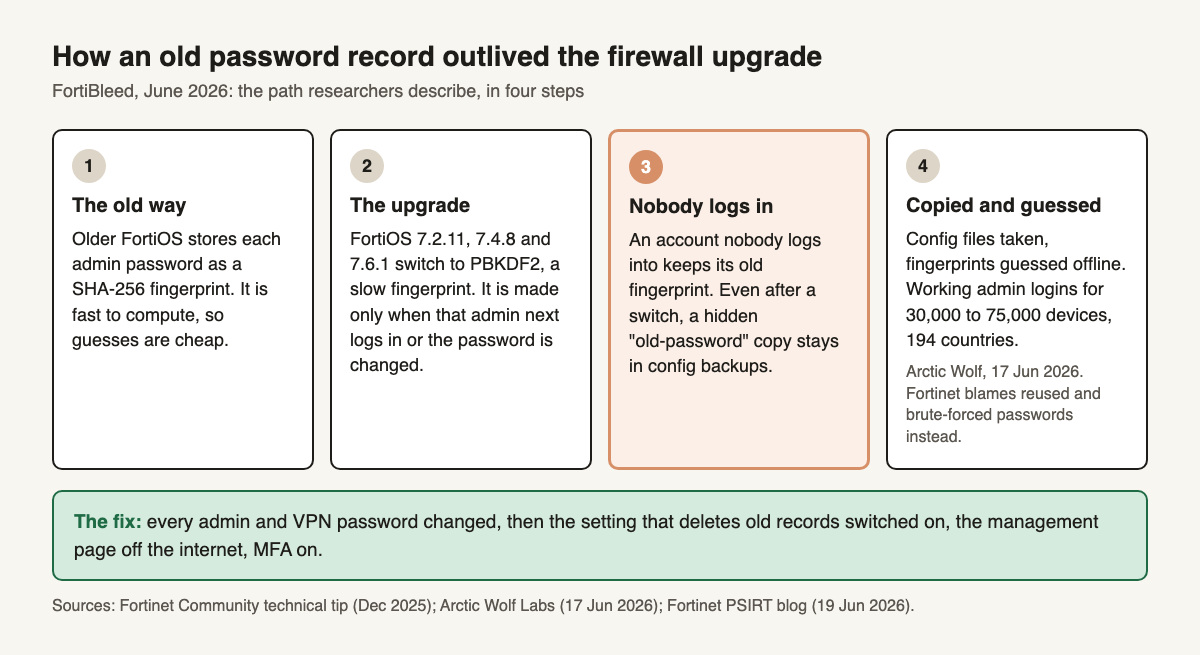
Image description
Title: How an old password record outlived the firewall upgrade. Subtitle: FortiBleed, June 2026: the path researchers describe, in four steps. Step 1, The old way: older FortiOS stores each admin password as a SHA-256 fingerprint. It is fast to compute, so guesses are cheap. Step 2, The upgrade: FortiOS 7.2.11, 7.4.8 and 7.6.1 switch to PBKDF2, a slow fingerprint. It is made only when that admin next logs in or the password is changed. Step 3, highlighted, Nobody logs in: an account nobody logs into keeps its old fingerprint. Even after a switch, a hidden "old-password" copy stays in config backups. Step 4, Copied and guessed: config files taken, fingerprints guessed offline. Working admin logins for 30,000 to 75,000 devices, 194 countries. Note: Arctic Wolf, 17 June 2026. Fortinet blames reused and brute-forced passwords instead. Green box, The fix: every admin and VPN password changed, then the setting that deletes old records switched on, the management page off the internet, MFA on. Sources: Fortinet Community technical tip (December 2025); Arctic Wolf Labs (17 June 2026); Fortinet PSIRT blog (19 June 2026).
Arctic Wolf’s account follows this path: attackers copied configuration files from FortiGates reachable from the internet and cracked the fingerprints stored in themSource 1, which it says likely explains the campaign’s reach. It does not say how the files were taken. Diachenko, quoted by Help Net Security, describes a second route: the group intercepted VPN login fingerprints and cracked them on a cluster of 45 graphics cardsSource 7.
Fortinet tells a different story, and the fix is the same
Fortinet says the attackers reused credentials from previous incidents and brute-forced devices with weak passwords and no second login step (MFA, short for multi-factor authentication, such as a code from a phone app)Source 3. Brute-forcing means trying password after password until one works.
We cannot settle which explains more of the devices, and no public report does either. Fortinet’s own advice covers the researchers’ path too: one of its steps is to remove the legacy password recordsSource 3. Both stories end at the same door: a weak or reused password, on an account nobody watches, on a management page the internet can reach, with no second login step.
Why the setup account is the likeliest weak spot
SOCRadar’s analysis, as reported by the Cloud Security Alliance, an industry research group, found about 35% of the exposed accounts were generic admin accounts, 28.3% were Fortinet’s own built-in system accounts, and 36.7% were named for the organizationSource 5. We could not open SOCRadar’s report, so treat these as SOCRadar’s claim; as relayed, it does not say which names it counted as built-in.
The pattern fits how small-business firewalls are set up: the provider creates an account on day one, often with a generic name, then works through another account or rarely visits. That setup account is the one most likely to be both weak and never logged into again, so it still holds the old fingerprint.
Watch for the opposite trick too. Fortinet tells customers to look for admin accounts they do not recognize with official-sounding names such as forticloud, fortiuser or fortinet-supportSource 3. An attacker who gets in can add one, and a password reset does not remove it.
Five questions to send your IT provider this week
You do not need to log into the firewall yourself. You need five answers from whoever manages it.
- Has every admin and VPN password been changed since June, on firmware 7.2.11, 7.4.8, 7.6.1 or later? An admin password changed on those versions is stored the new, slow way. Fortinet makes this reset its first stepSource 3. Only once every admin has a new password should the setting that deletes old password records be switched on.
- Are default and generic accounts renamed or disabled? Ask for a list of every admin account, who uses each one, and whether any are unfamiliar.
- Can the management page be reached from the internet? If yes, ask why, and whether it can be limited to the provider’s and your office’s addresses. Fortinet calls removing internet administration entirely the best optionSource 3.
- Is MFA on for every admin and every VPN user? A second factor stops a cracked password from opening the firewall or the VPN on its own. It does not help anywhere else the same password is used, so a password that also signs in to your office network must change too.
- Which firmware version is it on, and when was it last updated? Fortinet’s advice is to move to the latest 7.4, 7.6 or 8.0 releaseSource 3.
If any answer suggests your firewall was exposed, ask for four more of Fortinet’s own stepsSource 3:
- End every admin and VPN session that is currently open.
- Check the logs for admin logins from addresses nobody recognizes.
- Compare the current settings with a known-good copy, to spot accounts or rules nobody added on purpose.
- If the firewall checks logins against your office network accounts (Active Directory or LDAP), treat the account it uses as compromised too.
Here is an email you can paste and edit:
Hi, after the FortiBleed reports in June about FortiGate passwords, could you confirm five things about our firewall by Friday?
First, that every admin and VPN password has been changed since June, on firmware 7.2.11, 7.4.8, 7.6.1 or later, and that the old password records have since been deleted.
Second, a list of all admin accounts, with default or generic ones renamed or disabled, and any you do not recognize flagged.
Third, whether the management page can be reached from the internet, and if so, from where.
Fourth, that MFA is on for every admin and VPN user.
Fifth, which firmware version we run and when it was last updated.
Thanks.
Answers that should worry you
“We don’t know which version it’s on” means nobody owns the box. “Everyone has logged in since the upgrade” answers the wrong question: it changes how a password is stored, not whether someone already has it. “We leave the management page open so we can support you remotely” is the most common one, and it is a convenience, not a requirement.
A provider can reach your firewall from its own fixed address, through a VPN with MFA, or through Fortinet’s trusted-hosts setting, which only accepts logins from listed addresses. If your provider refuses all of those, that tells you about the provider, not the firewall.
- Every admin and VPN password changed since June, on current firmware Then the setting that deletes old password records switched on.
- Default and generic admin accounts renamed or disabled
- Management page not reachable from the open internet
- MFA on every admin and VPN account And any reused password changed wherever else it is used.
- Firmware version known and current Fortinet points to the latest 7.4, 7.6 or 8.0 release.
- Unfamiliar accounts and logins checked for Names like forticloud or fortinet-support, and admin logins from unknown addresses.
Next step
Get new posts as they come out
Every new post, in plain English and in depth. Follow the RSS feed.
Sources
- Arctic Wolf Labs: Active FortiBleed Campaign Impacting Fortinet Devices Across 194 Countries (17 Jun 2026). Retrieved . ↩ ↩ ↩
- CISA alert: CISA urges hardening Fortinet devices after reports of credential exposure (18 Jun 2026). Retrieved . ↩
- Fortinet PSIRT blog: Analysis of Reported Credential Compromise of FortiGate Devices (19 Jun 2026). Retrieved . ↩ ↩ ↩ ↩ ↩ ↩ ↩ ↩ ↩
- Recorded Future: FortiBleed campaign exposing credentials for 73,932 FortiGate systems. Retrieved . ↩
- Cloud Security Alliance research note: FortiBleed, default credential exploitation (20 Jun 2026). Retrieved . ↩ ↩
- Fortinet Community: Enforcing PBKDF2 as hash function for administrator accounts in FortiOS v7.2.11 and later. Retrieved . ↩ ↩
- Help Net Security: FortiBleed data leak (18 Jun 2026, updated 29 Jun). Retrieved . ↩