Enterprise-Grade, Explained · For engineers
axios npm supply chain attack: 2 bad versions, 3 hours, how to check
On 31 March 2026, two versions of a hugely popular JavaScript web-request library carried a hidden trojan installer for about three hours. Here is what happened, who was exposed, and a ten-minute check of your own project.
Short answer On 31 March 2026, attackers published two poisoned versions of axios for about three hours. Installing them ran a hidden script that installed a remote-access trojan. Installs from a lockfile with npm ci almost certainly did not get them; others should search for plain-crypto-js and rotate secrets on any hit.
axios is a very common JavaScript library for making web requests from a program. npm is the public registry where JavaScript projects download libraries like it. Between 00:21 and about 03:15 UTC on 31 March 2026, two versions of axios on npm were not the maintainers’ code. Anyone whose install ran the hidden script in that window got a remote access trojan, a program that gives an attacker control of the machine.
Does it affect you? Only if a machine ran an install that resolved axios@1.14.1 or axios@0.30.4 in those hours, or pulled them later from a mirror or cache that had kept a copy. A project with a committed lockfile, installed with npm ci, almost certainly did not. The check is below. If you find the hidden package, treat that machine as compromised and rotate its secrets.
Three hours on 31 March, in order
The maintainers’ post-mortem gives the timeline in UTC. A clean-looking helper package, plain-crypto-js, was first published on 30 March. At 00:21 on 31 March, axios 1.14.1 appeared with that package added as a dependency. At roughly 01:00, axios 0.30.4 followed with the same additionSource 1.
Around 01:00 people started reporting it on GitHub. The attacker, still holding the maintainer’s account, deleted those reportsSource 1. A collaborator opened a pull request to deprecate the versions at 01:38 and contacted npm directly. npm removed both versions at 03:15 and the helper package at 03:29. Google’s threat intelligence group puts the end of the window at 03:20 insteadSource 2, so say “about three hours”, not a minute count.
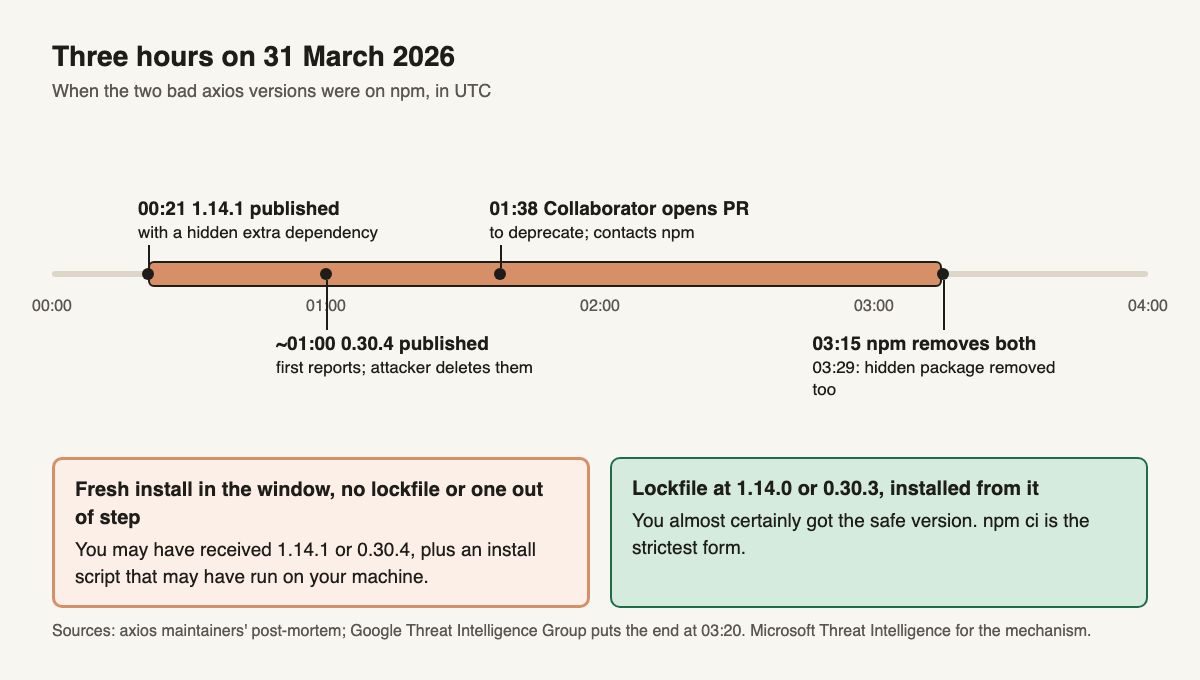
Image description
Title: Three hours on 31 March 2026. A horizontal time axis from 00:00 to 04:00 UTC with a highlighted band from 00:21 to 03:15. Markers: 00:21, axios 1.14.1 published with a hidden extra dependency. About 01:00, axios 0.30.4 published; first public reports, which the attacker deleted. 01:38, a collaborator opens a pull request to deprecate the versions and contacts npm. 03:15, npm removes both axios versions. 03:29, npm removes the hidden dependency, plain-crypto-js. Two boxes below. Left, orange: installed in the window with no lockfile or with a floating range, you may have received 1.14.1 or 0.30.4. Right, green: lockfile pinned to 1.14.0 or 0.30.3 and installed from the lockfile, you almost certainly received the safe version. Google puts the end of the window at 03:20. Sources: axios post-mortem; Google Threat Intelligence Group; Microsoft Threat Intelligence.
Scale is the part coverage inflates. Google says the two release lines typically see over 100 million and 83 million weekly downloadsSource 2; Microsoft says axios has over 70 millionSource 3. Neither gives a count of copies of the bad versions.
The axios code was clean; the extra dependency was the weapon
Nobody changed what axios does. Microsoft Threat Intelligence reports the bad releases simply added plain-crypto-js@4.2.1, which axios never imports, and that package has an install script: a command npm runs automatically right after download, with no click from youSource 3. Reading the axios source would have shown nothing.
The script contacted an attacker-controlled server, sent the operating system, and received a second stage built for Windows, macOS or Linux. Microsoft says the final program is a remote access trojan, and that the installer then deleted its loader and swapped its own package.json so the install hook disappears from the folder afterwardSource 3. That detail changes how you check: do not rely on opening the package folder and looking for a script.
The attacker also published a harmless plain-crypto-js@4.2.0 the day before, which Microsoft says was to establish publishing history and reduce scrutiny of the package. And the bad axios releases lacked the CI-backed publishing trail, a matching repository tag or trusted-publisher record, that normal axios releases hadSource 3.
How a maintainer with 2FA lost the account
The post-mortem says the attacker reached the lead maintainer’s computer through a targeted social engineering campaign and RAT malware, then took the npm credentials from itSource 1. In a comment the maintainer describes a cloned company, a Slack workspace and a Teams call, then a prompt to install “the missing item”, which was the trojanSource 1. He also says two-factor login (a code from an app or key) was on for npm. The post-mortem, dated 2 April, said the investigation was ongoing and that the project had no confirmed details on how the attacker got past its account protectionsSource 1.
The maintainer’s answer was that malware on his machine could do anything he could, and a commenter explains that a stolen logged-in session makes a login code irrelevantSource 1. That is an explanation, not a confirmed finding. In our view the lesson is that a login code does not protect a machine that is already compromised. The maintainers’ list of fixes: publish from CI with OIDC (short-lived tokens, no stored password), make releases immutable, and reset every device and credential. They also admit there was no automated way to detect an unauthorized publishSource 1. One contributor says the 1.x releases already used trusted publishing and that only the malicious release lacked itSource 1; that is a commenter’s claim, not the maintainers’.
Two security teams, two names for the same country
Microsoft attributes the activity to Sapphire Sleet, a North Korean state actorSource 3. Google attributes it to UNC1069, which it calls a financially motivated actor linked to North Korea, citing a reused malware family and infrastructure overlapsSource 2. Microsoft adds that the account that created the helper package is associated with Sapphire Sleet infrastructure and that the command domain is Sapphire Sleet-ownedSource 3. Both names are each company’s own label for a group. What they agree on is the country, the versions, and the mechanism.
Why most projects were fine and some were not
A version range like ^1.14.0 means “this or any newer 1.x”. Microsoft notes that projects with such ranges could pull the malicious versions automaticallySource 3. What stops that is the lockfile, the file (package-lock.json, pnpm-lock.yaml or yarn.lock) that records the exact version installed last time.
The npm docs say npm ci requires that lockfile and exits with an error instead of updating it if it disagrees with package.json. It installs exactly what was recordedSource 4. A plain npm install with a lockfile that agrees with package.json also installs the locked versions. In our view the exposed projects were those with no lockfile committed, a lockfile that disagreed with package.json so npm install resolved it again, an npm update or a fresh add of axios, or a bot-opened update pull request that someone merged in those three hours.
Check your project in ten minutes
Run these in the repository, then on every CI runner and laptop that installs it. Microsoft’s list of checks is the same idea: search installed folders and CI logs for the package, and look at network logs for the attacker domainSource 3. Do the searches before you reinstall anything: npm ci deletes an existing node_modules before it installsSource 4, and that folder is the evidence.
- Lockfile. Search for the helper package:
grep -n "plain-crypto-js" package-lock.json npm-shrinkwrap.json pnpm-lock.yaml yarn.lock bun.lock. Google’s guidance is to look for 4.2.0 or 4.2.1Source 2. A hit means it was resolved; it does not prove the install ran. No hit is not a clearance either, because a lockfile can be regenerated or rolled back, so also rungit log --oneline -S plain-crypto-js -- package-lock.json pnpm-lock.yaml yarn.lockto search history. - Which axios.
npm ls axiosorpnpm why axiosshows the installed version, including copies pulled in by other libraries. 1.14.1 and 0.30.4 are the bad ones; the safe versions named are 1.14.0 and 0.30.3. - Installed folders.
find ~ /path/to/projects -xdev -type d -name plain-crypto-js -path "*node_modules*"on laptops and build machines. Read any permission errors: a folder you could not open is not a clean result. The folder existing is the signal, even if its contents were cleaned. Also check build caches, Docker image layers and CI caches. - CI history. Search install logs from 31 March, 00:21 to 03:20 UTC, for either bad version or the helper package.
- Network logs. Search outbound DNS and firewall logs for
sfrclak[.]comand142.11.206[.]73on port 8000, without the brackets (they stop the text turning into a link). The .73 form is in Microsoft’s indicator table, in Google’s post and in the maintainers’ post-mortem; Microsoft’s checklist prints .72 once, which looks like a typo. A clean log is not a clearance if your DNS or firewall logs are kept only briefly.
If anything matches, Google’s advice is to assume the host is compromised and rotate every credential and secret on itSource 2. Before you wipe or reinstall, disconnect the host, copy the install logs and keep a disk snapshot. Then rotate from a clean machine, never from the affected one, since the attacker can read whatever you type there. Go in this order: cloud and CI tokens, npm and GitHub tokens, SSH keys, then .env files and any other CI secrets that were present. The axios version is the smallest part of the cleanup. Downgrading removes the library, not the trojan; rebuild the machine from a clean image.
Three settings that shrink the exposure window
pnpm’s minimumReleaseAge refuses to install a version until it is a set number of minutes old. The current docs give a built-in default of 1440, one day, which is non-strict, so some resolutions can bypass itSource 5. Older pnpm may have no default, so check pnpm -v. Set the value yourself in pnpm-workspace.yaml; an explicit setting also turns strict mode on by default, so the install fails instead of falling back to a newer version. A one-day cooldown would have blocked both bad versions in strict mode, because npm removed them in about three hours. npm has the same idea: min-release-age in days, default off, in the npm 11 config docs; check your npm versionSource 6.
Install scripts are the second layer. Per the npm docs, npm ci --ignore-scripts stops npm running scripts in package.json filesSource 4. Microsoft recommends this and lists the global npm config set ignore-scripts trueSource 3. With it on, the helper package downloads but never executes. The cost is that packages needing an install step (native builds, Git hook tools such as Husky) stop working until you run those steps yourself. pnpm goes further: packages not listed in allowBuilds are disallowed from running build scripts by defaultSource 7. A few libraries need an explicit allow, which is exactly the review you want.
Third, do not let a bot merge on its own. Microsoft suggests restricting Dependabot (GitHub’s automatic dependency-update bot) and Renovate updates for axios during a live incidentSource 3. In our view a release-age cooldown and blocked install scripts each cut a different part of this attack, and either alone would have stopped it; neither depends on noticing the compromise in time.
- Lockfile committed, CI installs with npm ci or the pnpm/yarn frozen equivalent A mismatch should fail the build, not rewrite the file.
- Searched lockfiles, git history, node_modules, caches and CI logs for plain-crypto-js and axios 1.14.1 / 0.30.4 Before any npm ci or node_modules deletion.
- Searched network logs for sfrclak[.]com and 142.11.206[.]73 (port 8000) Remove the brackets to search.
- If anything matched: kept logs and a snapshot, rebuilt the machine, rotated every secret from a clean machine Cloud and CI tokens first, then npm and GitHub tokens, SSH keys, .env files.
- Release-age cooldown set (pnpm minimumReleaseAge, npm min-release-age) and dependency install scripts blocked or allow-listed
- Bots cannot merge dependency updates without a human and a waiting period
Next step
Get new posts as they come out
Every new post, in plain English and in depth. Follow the RSS feed.
Sources
- axios maintainers: Post Mortem, axios npm supply chain compromise (GitHub issue 10636, April 2026). Retrieved . ↩ ↩ ↩ ↩ ↩ ↩ ↩ ↩
- Google Threat Intelligence Group: North Korea-nexus threat actor compromises widely used Axios npm package (1 Apr 2026). Retrieved . ↩ ↩ ↩ ↩ ↩
- Microsoft Threat Intelligence: Mitigating the Axios npm supply chain compromise (1 Apr 2026). Retrieved . ↩ ↩ ↩ ↩ ↩ ↩ ↩ ↩ ↩ ↩
- npm docs: npm ci. Retrieved . ↩ ↩ ↩
- pnpm docs: dependency resolution settings (minimumReleaseAge). Retrieved . ↩
- npm docs: config (min-release-age, ignore-scripts). Retrieved . ↩
- pnpm docs: build settings (allowBuilds). Retrieved . ↩